How to Research a Shopify Competitor's Facebook and Instagram Ads
The short answer
Open the Meta Ad Library (facebook.com/ads/library), set the category to All ads, search the competitor's Page and filter to active ads. Ads that have run for 30+ days and have multiple versions are usually the profitable ones. Study their hooks, formats and offers, then build your own.
Your competitors' ads are public. Every ad running on Facebook and Instagram is listed in Meta's Ad Library, free to search, no account needed. That makes it one of the best sources of competitive intelligence you have: you can see which products a brand is pushing, which angles they're testing, and which ads they've kept running long enough to be profitable.
This guide shows how to search the Ad Library effectively, how to tell a winning ad from a test, and how to turn what you find into better ads of your own.
What is the Meta Ad Library?
The Meta Ad Library is Meta's public database of ads running across Facebook, Instagram, Messenger and the Audience Network. Meta created it for transparency, and it's open to anyone at facebook.com/ads/library.
For each ad you can see the creative, the text, the platforms it runs on, when it started running and whether it's still active. For ads shown in the European Union, Meta also publishes reach and audience breakdowns (age, gender and country), because of EU transparency rules. Spend is only published for political and social issue ads.
How do you find a competitor's ads?
- Open the Ad Library.
- Choose a country (or "All") and set the ad category to All ads.
- Type the competitor's brand name and pick their Page from the suggestions. Searching by Page shows every ad from that advertiser.
- Use the filters: Active status set to "Active ads", plus platform, media type and date range if you need them.
To research a niche rather than one brand, search a keyword instead (a product type, a benefit, a phrase like "free shipping"). You'll see every advertiser using it, which is also a good way to find new Shopify stores in your niche.
How do you read an ad in the Ad Library?
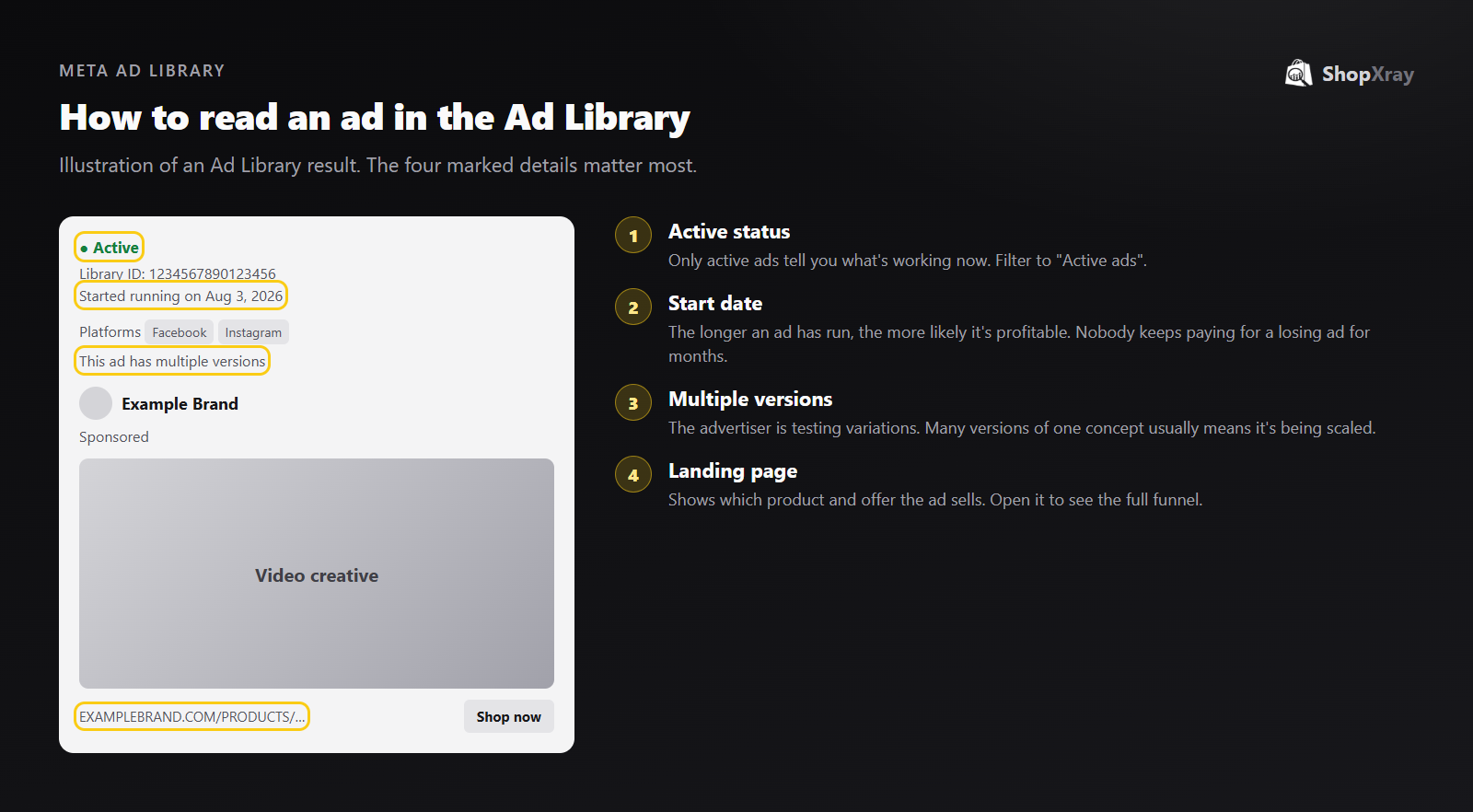
Four details matter more than the creative itself:
- Active status. Only active ads show what's working now.
- "Started running on" date. Advertisers stop ads that lose money. An ad that has run for months is very likely profitable.
- "This ad has multiple versions". The brand is testing variations of the same concept, a sign they're investing in it.
- The landing page. It tells you which product and offer the ad sells. Always click through.
How do you tell a winning ad from a test?
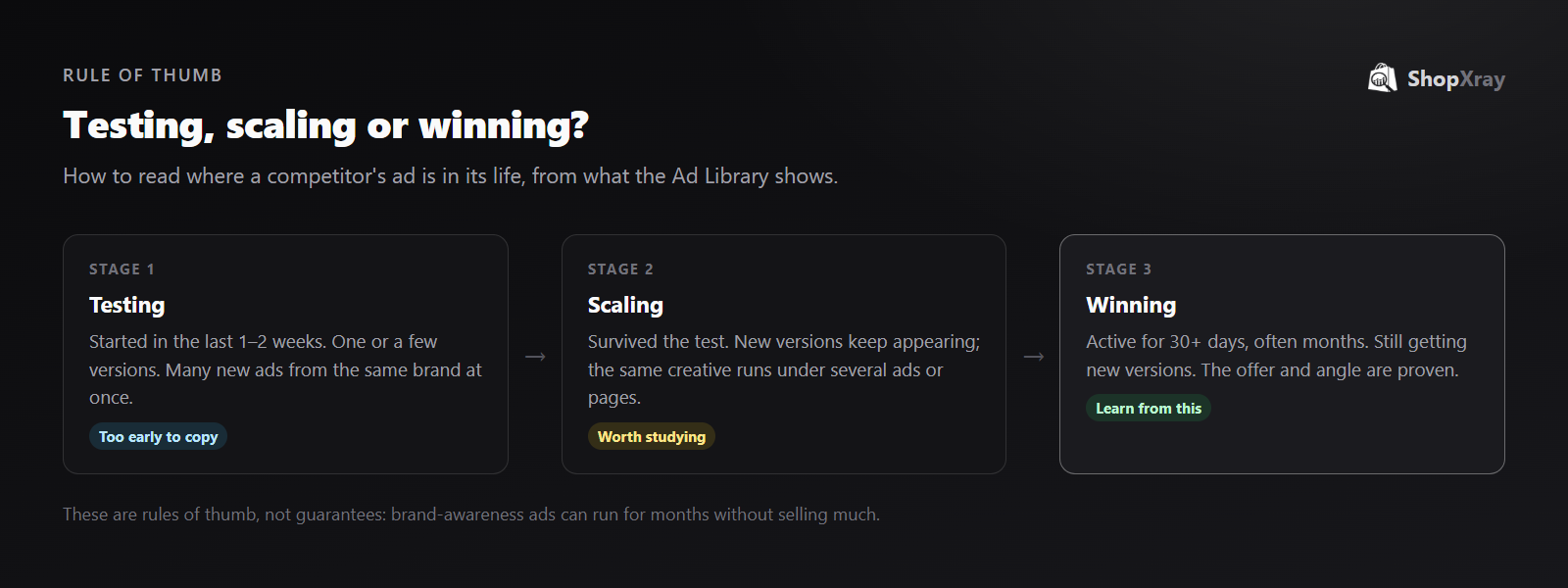
Most ads you see are tests, and most tests fail. Copying a test means copying something that may not work. Use how long the ad has run and how many versions exist to place it:
| Stage | What you see | What to do |
|---|---|---|
| Testing | Started in the last 1–2 weeks, a burst of new ads at once | Note the angles, but don't copy yet |
| Scaling | Still active after the test, new versions keep appearing | Study the hook, format and offer |
| Winning | Active for 30+ days, often months, still being iterated | Learn the angle and build your own version |
One caveat: brand-awareness and retargeting ads can run for a long time without being big sellers. Weigh how long an ad has run alongside the landing page and offer.
What should you look for in competitors' ads?
Once you've found their long-running ads, break each one down:
- The hook. The first line of text or first three seconds of video. This is what stops the scroll.
- The format. UGC-style video, founder talking to camera, product demo, static image, carousel. Note which formats keep running.
- The angle. Problem and solution, social proof, comparison, gifting, price. Brands usually have two or three angles that work.
- The offer. Discount, bundle, free shipping, guarantee. Compare it with what's on the site.
- The product. Which products get the most ad support? Cross-check with their best sellers.
- The landing page. A product page, a collection or a dedicated landing page? Long-running ads often point to purpose-built pages.
How can you see results, not just ads?
The Ad Library shows what's running, not what it earns. For EU-delivered ads, the reach numbers give a sense of scale. To connect ads to results, you need to look at the store's sales of the advertised product at the same time.
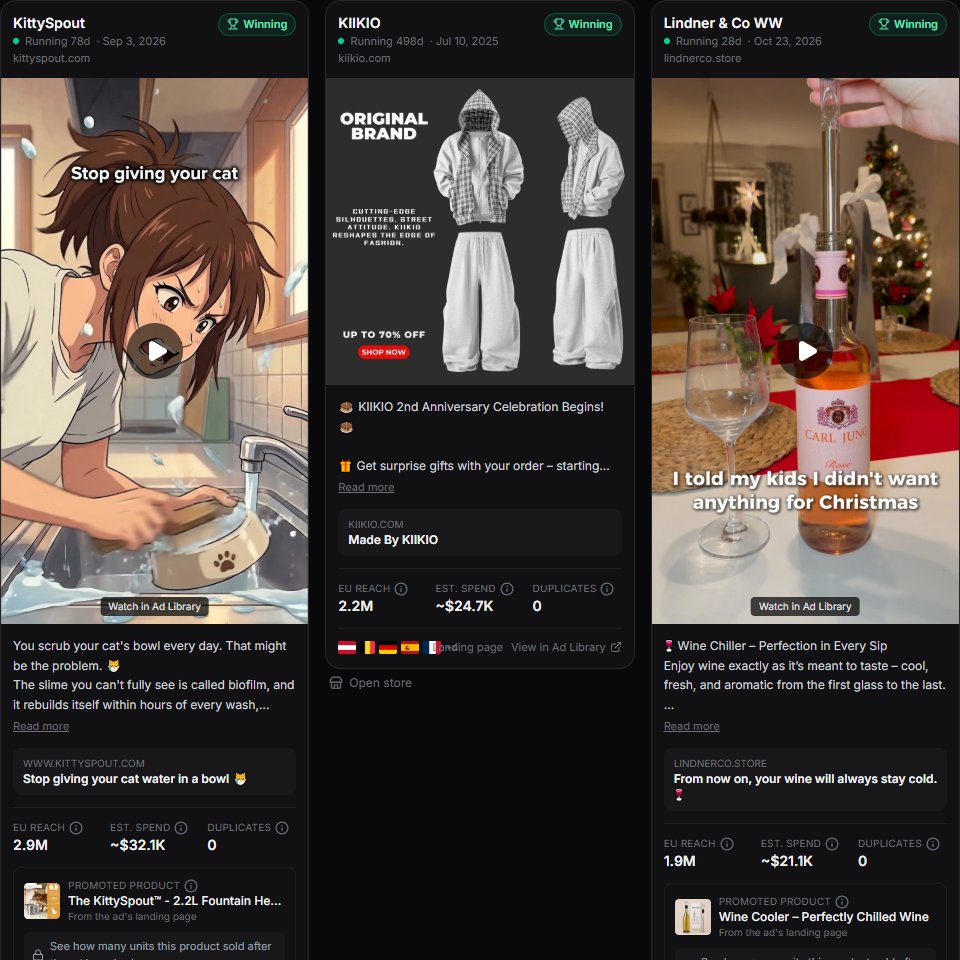
ShopXray's Winning Ads does this for Shopify stores. It collects Facebook and Instagram ads from Meta's official Ad Library data, labels each one Testing, Scaling or Winning with the reasons, estimates reach and spend for EU-delivered ads, and for stores you track it shows the advertised product's sales before and after the ad started.
What's fair game and what isn't?
Researching public ads is normal and legal. Copying them isn't. Use competitors' ads to learn which angles, formats and offers resonate with your shared audience, then make your own. Don't reuse their footage, images, copy or brand name. Besides the legal risk, Meta penalizes duplicated creative, and customers notice.
Ads are one input to a complete Shopify competitor analysis. Put them next to the competitor's products, pricing and apps to see the full strategy.
Frequently asked questions
Can I see my competitors' Facebook ads for free?
Yes. Every ad running on Facebook, Instagram, Messenger and the Audience Network is listed in the Meta Ad Library at facebook.com/ads/library. You don't need an account to search it.
Can I see how much a competitor spends on Facebook ads?
Meta only publishes spend for political and social issue ads. For ads shown in the EU, it publishes reach and audience breakdowns, which tools can use to estimate spend.
How do I know if a competitor's ad is working?
Look at how long it has been running and whether it has multiple versions. Advertisers stop losing ads quickly, so an ad that has been active for 30 days or more and is still being iterated is usually profitable.
Can I see a competitor's Facebook ad targeting?
Not the exact targeting. For ads delivered in the EU, the Ad Library shows reach by age, gender and country, which reveals who the ad actually reached.
Is it legal to copy a competitor's ad?
Researching public ads is fine, but reusing their footage, images, copy or brand is not. Learn the angle and format, then create your own ad.


