Shopify Ad Spy for Winning Facebook Ads
Browse ads from thousands of Shopify stores, sorted by what's actually working: long-running ads, ads that are scaling, and ads tied to real product sales. .
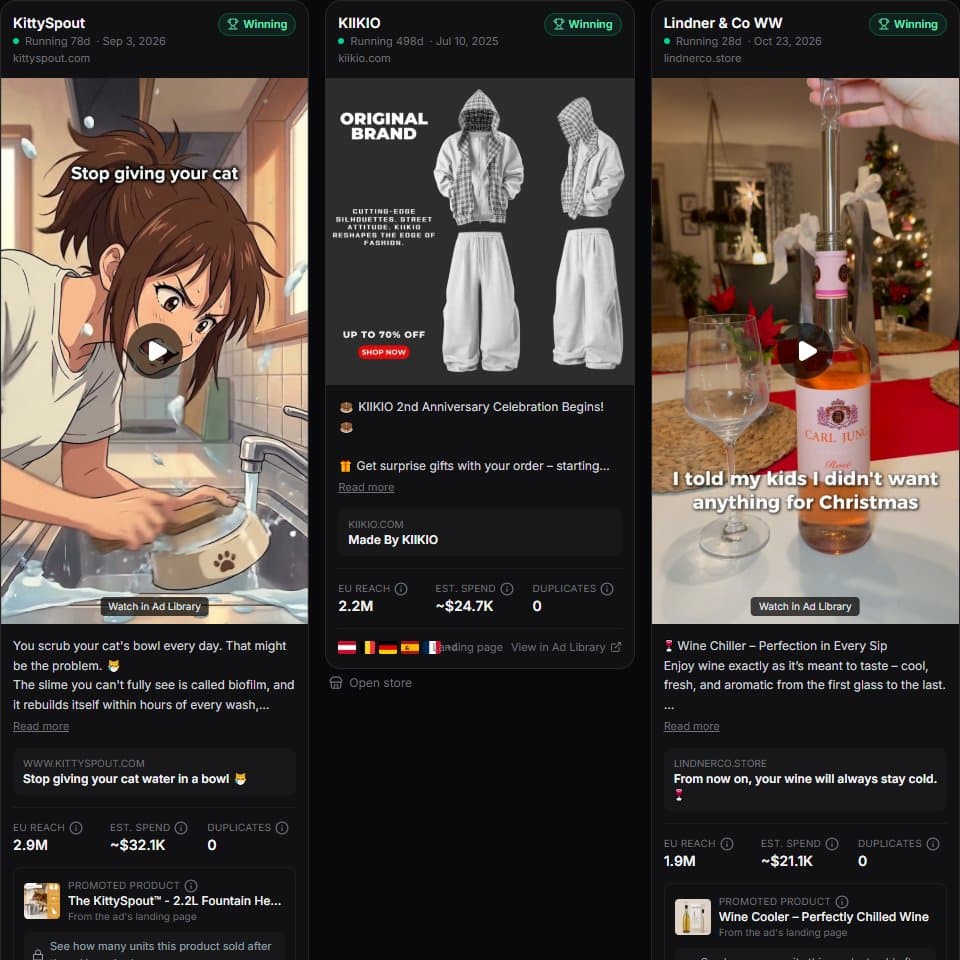
What is a Shopify ad spy tool?
A Shopify ad spy tool shows you the Facebook and Instagram ads that Shopify stores are running, so you can see which products, angles and creatives are working before you spend your own budget. ShopXray's Winning Ads collects ads from Meta's official Ad Library, keeps only the ones that link to Shopify stores, and labels each one Testing, Scaling or Winning with the reasons shown. For stores you track, it goes one step further and shows whether the advertised product's sales went up after the ad started.
- Shopify stores with ads, growing daily
- 1000s
- Ad scores: Testing, Scaling, Winning
- 3
- EU countries + UK with reach data
- 28
- Plan with 50 top ads to browse
- Free
Why spy on competitors' ads?
A store that keeps paying for the same ad for 30, 60 or 90 days is telling you something: the ad makes money. Long-running ads, ads copied into several versions, and pages that suddenly launch many new ads are the strongest public signals of a winning product.
Looking at those ads shows you the product, the price point, the hook in the first line of copy, the creative format (image, video or carousel) and the landing page. That's market research you'd otherwise pay for with your own ad budget.
What you see on every ad
Each ad card in the Winning Ads feed is built from Meta's own data plus what ShopXray knows about the store:
- The creative and copy: image or video cover, primary text, headline and call to action. Creatives are stored by ShopXray, so they don't break when Facebook's links expire.
- Days running and whether the ad is still active.
- EU reach (how many people in the EU and UK saw it), split by country, age and gender.
- Estimated spend, modelled from reach (see the ad spend estimator page for the method).
- Ad score with its reasons, such as "running 47 days" or "3 copies of this creative".
- The store and the product the ad links to, with the store's country and category.
- Sales since the ad started, for stores you track: units sold in the 7 days before and after.
How ads are scored
Scores are rules, not guesses, and every badge lists the rule that triggered it.
- Winning: running 30+ days with at least 10,000 EU reach, or 100,000+ reach after 14 days, or the product's measured sales clearly rose after the ad started.
- Scaling: the same creative duplicated into 3+ new ads, reach up 25%+ in a week, or the store's page adding active ads fast.
- Testing: new ads (under 7 days) or ads without a clear signal yet.
Who uses it
Dropshippers use it to find products that are already selling and see how they're pitched. Brand owners use it to watch competitors' creative tests. Media buyers and agencies use it for creative inspiration and to show clients what's working in their niche.
How to find winning ads in ShopXray
Open Winning Ads
Sign in and open Winning Ads from the dashboard. The feed opens on the strongest ads first.
Pick a preset
Choose New this week, Running 30+ days, Best selling or Scaling to jump to the ads that match your goal.
Filter by niche and market
Narrow by keyword, store category, the country the ad ran in, format (image, video, carousel) or score.
Open the store
Click through to the store's report to see its products, best sellers, apps and every other ad it runs.
ShopXray Winning Ads vs. the free Meta Ad Library
| Meta Ad Library | ShopXray Winning Ads | |
|---|---|---|
| Search across all advertisers | ||
| Only Shopify stores | ||
| Sorted by what's working (score) | ||
| Days running and EU reach on every card | Per ad, one by one | |
| Estimated ad spend | ||
| Product the ad sells | ||
| Sales after the ad started | Tracked stores | |
| Creatives kept after the ad stops |
What to know before you start
- Ads come from Meta's official Ad Library API, which publishes ordinary commercial ads only when they ran in the EU or UK. A store that advertises only in the US won't show ads here. This applies to every tool that uses Meta's data.
- Spend is an estimate based on reach, not a figure Meta publishes for commercial ads.
- Covers Facebook, Instagram, Messenger and Audience Network ads. TikTok and Google ads are not included.
- The free plan shows a fixed set of 50 top ads. Paid plans search and filter the full feed.
Frequently asked questions
Common questions about spying on Shopify stores' ads.