Track Your Competitors' Facebook & Instagram Ads
Follow any Shopify store's ads in one place. See every new creative, which ads keep running, when the brand starts scaling, and whether the product behind the ad is actually selling.
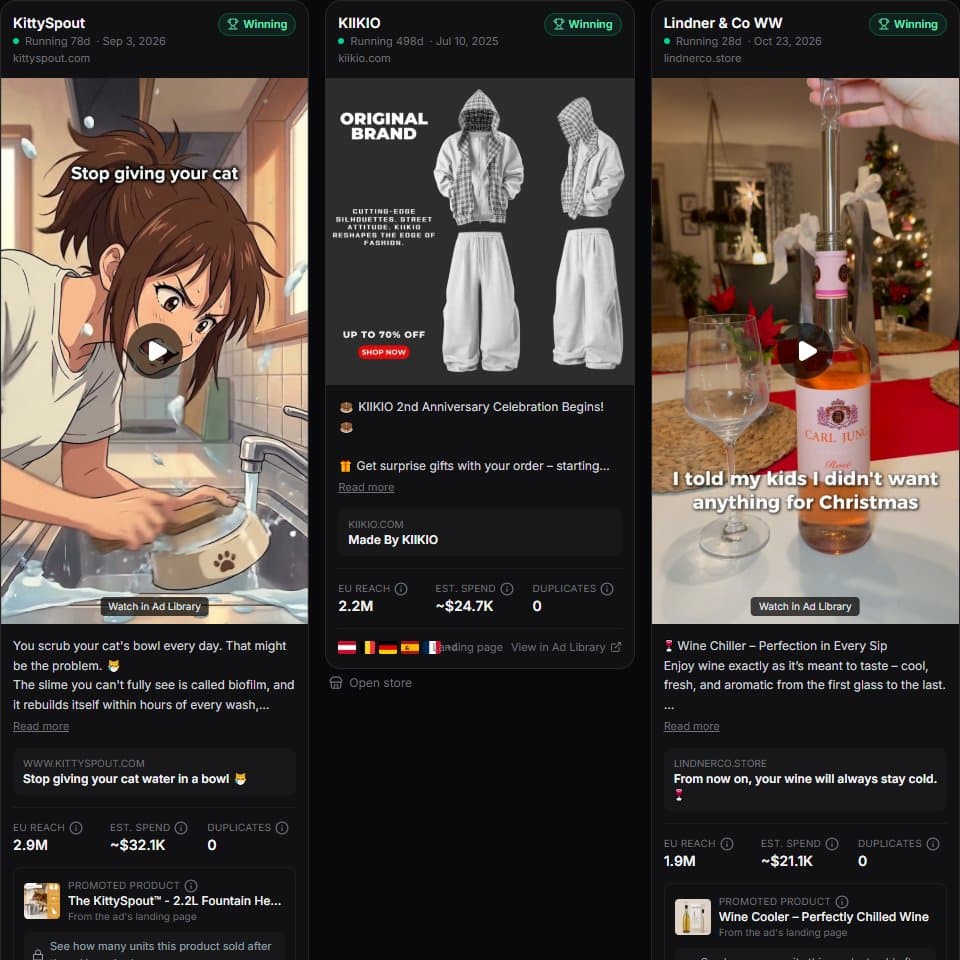
How do you track a competitor's Facebook ads?
Add the competitor's Shopify store to ShopXray. It finds the store's Facebook page, pulls every ad the page runs from Meta's Ad Library, and refreshes them every 12 hours for stores you track. Each store report gets an Ads tab with every creative, how long it has run and its EU reach, and paid plans send alerts when the store launches new ads, starts scaling, or keeps an ad running for 30, 60 or 90 days. Because ShopXray also tracks the store's sales, it can show whether the advertised product sold more after the ad started.
- Refresh for stores you track
- 12 h
- Day milestones flagged
- 30 / 60 / 90
- Sales compared before vs. after an ad
- 7 days
- Facebook page found from the store
- Auto
What the Ads tab shows for each store
Open any store report and the Ads tab lists the store's ads, newest or strongest first:
- Active ad count, ads launched in the last 7 days, and a scaling / steady / slowing label for the brand.
- Every creative with its copy, headline, start date, days running, platforms and countries.
- EU reach and an estimated spend, labelled as an estimate.
- How many times the same creative has been duplicated.
- The product the ad points to, matched from the landing page.
- Sales since the ad started: units and revenue of that product in the 7 days before vs. after, for stores you track.
Alerts that matter
On Growth and Enterprise, ShopXray adds ad events to your daily email, so you hear about changes without checking:
- New ads: "Store X launched 6 new ads".
- Scaling: the page's active ads are up 30% or more on last week.
- Milestones: an ad has now run 30, 60 or 90 days, a strong sign it's profitable.
Why pair ads with sales data
Every ad tracker shows ads. Most can only guess whether they work from reach and run time. ShopXray tracks the store's inventory and sales too, so for tracked stores you can see the sales lift: if a product sold 4 units the week before an ad launched and 40 the week after, that's a signal no amount of reach data can give you.
How to track a competitor's ads
Analyze the store
Paste the competitor's store URL into ShopXray. The report opens with products, apps, theme and the Ads tab.
Check the linked page
ShopXray finds the store's Facebook page from its site and the Ad Library. You can correct it if a brand uses another page.
Track the store
Add it to tracking. Its ads refresh every 12 hours and its sales start being measured.
Read the alerts
New ads, scaling and long-running ads appear in your daily email and on the store's Ads tab.
Tracking ads by hand vs. with ShopXray
| Checking the Ad Library manually | ShopXray Ad Tracker | |
|---|---|---|
| Find the brand's Facebook page | By hand | Automatic |
| See new ads | Revisit and compare | Alert |
| Know when a brand starts scaling | ||
| Days running and reach history | Current only | |
| Creatives kept after ads stop | ||
| Product each ad sells | ||
| Sales before vs. after the ad | Tracked stores |
Good to know
- Ads come from Meta's Ad Library API, which covers commercial ads that ran in the EU or UK. A store advertising only in the US will show no ads.
- Sales lift needs the store to be tracked, and needs a week of data before the ad started.
- Alerts are on Growth and Enterprise. The free plan shows 3 ads per store; paid plans show all of them.
Frequently asked questions
Common questions about tracking competitors' ads.