Shopify Inventory Tracker — Track Stock Levels & Get Restock Alerts
Monitor competitor inventory at the variant level. Get exact stock quantities, detect restock events, and identify which products are in high demand.
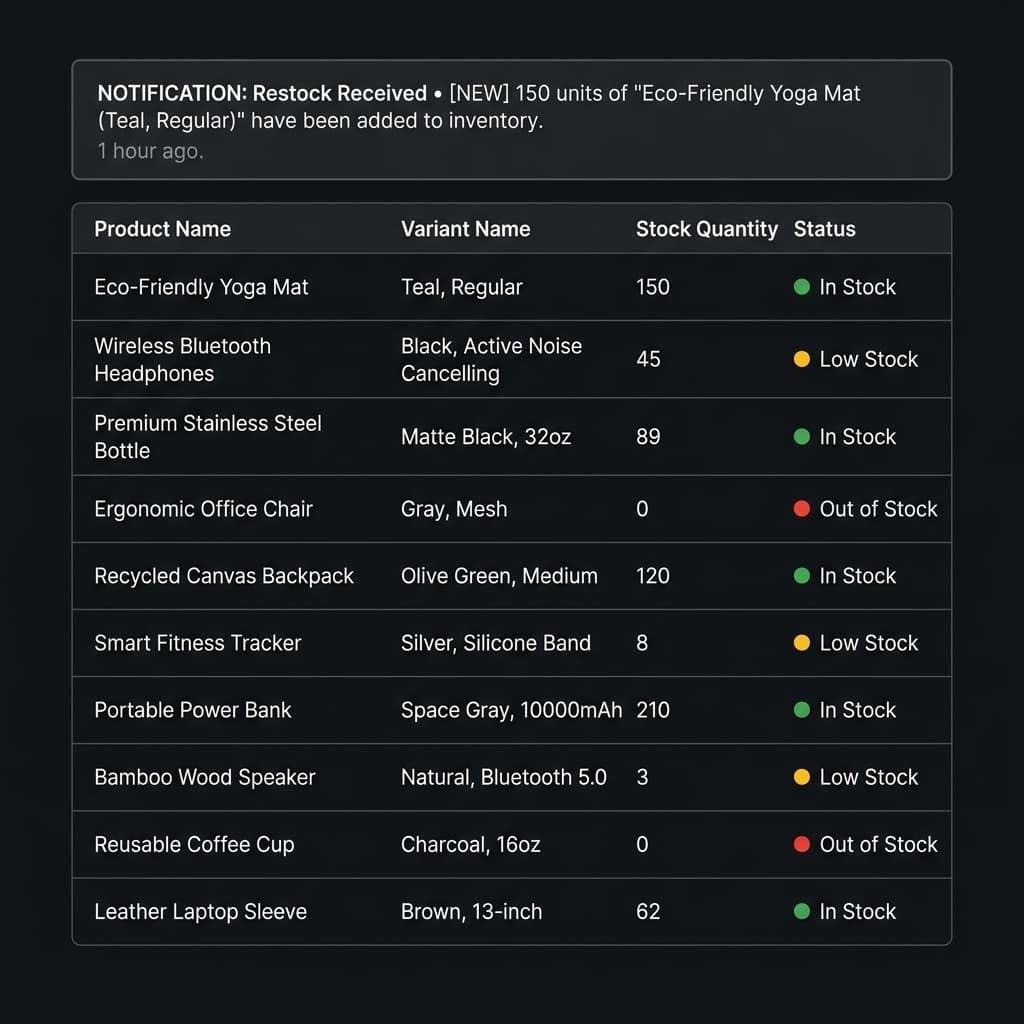
What is Shopify Inventory Tracking?
Shopify inventory tracking is the practice of monitoring the stock levels of products on any Shopify store over time. By taking regular snapshots of a store's inventory, you can detect when products sell (stock decreases) and when they are restocked (stock increases).
ShopXray takes this further with variant-level accuracy. Rather than just tracking products, we monitor individual variants — every size, color, and option. On paid plans, our proprietary technology reveals exact unit counts, so you know that a competitor has 47 units of "Blue / Large" remaining — not just that it's "in stock."
How ShopXray Tracks Inventory
Basic Availability Detection
Available on all plans. ShopXray monitors whether each product variant is available or unavailable. This gives you a clear in-stock versus out-of-stock view across the entire catalog.
Advanced Quantity Detection
Available on paid plans. Our proprietary technology detects exact stock quantities for each variant, returning precise unit counts. This is the most accurate way to monitor competitor inventory without admin access.
Variant-Level Monitoring
Every variant is tracked independently. A product with 5 sizes and 3 colors has 15 variants — ShopXray tracks all 15. This granularity reveals which specific options are popular and which are sitting unsold.
Inventory Tracking Features
Exact Stock Quantities
See precise unit counts for every variant using our proprietary technology.
Restock Alerts
Get notified instantly when competitors restock popular products.
Inventory Snapshots
Regular snapshots capture the full state of a store's inventory.
Low-Stock Detection
Identify products running low on stock before they sell out.
Variant-Level Detail
Track inventory for every size, color, and variant — not just the product.
Completely Undetectable
Store owners have no way to know their inventory is being monitored.
How to Track Competitor Inventory
Add a Store
Enter a Shopify store URL and add it to your tracking list.
Automated Scanning
ShopXray takes inventory snapshots every 12–24 hours automatically.
Monitor Changes
View stock levels, detect sales and restocks, and receive alerts.
Why Track Competitor Inventory?
Inventory data reveals what no other metric can — real demand. A product that frequently restocks is in genuine demand. A product that stays fully stocked for weeks may not be selling. Low stock on a specific variant tells you exactly which options are popular. This intelligence directly informs your product sourcing, pricing, and marketing decisions.
Explore related features
Frequently asked questions
Common questions about Shopify inventory tracking.